Engineering Change Control Between PCB Assembly Batches
Direct answer: Control an engineering change between PCB assembly batches by defining its effective lot, regenerating every affected file, deciding the disposition of old stock, updating process and test instructions, and obtaining cross-functional approval. Superseded packages should no longer appear active.
What decision does this guide support?
This decision tree is for changes introduced after at least one build has been completed or released. It connects design intent to material, manufacturing, programming, test, and batch records.
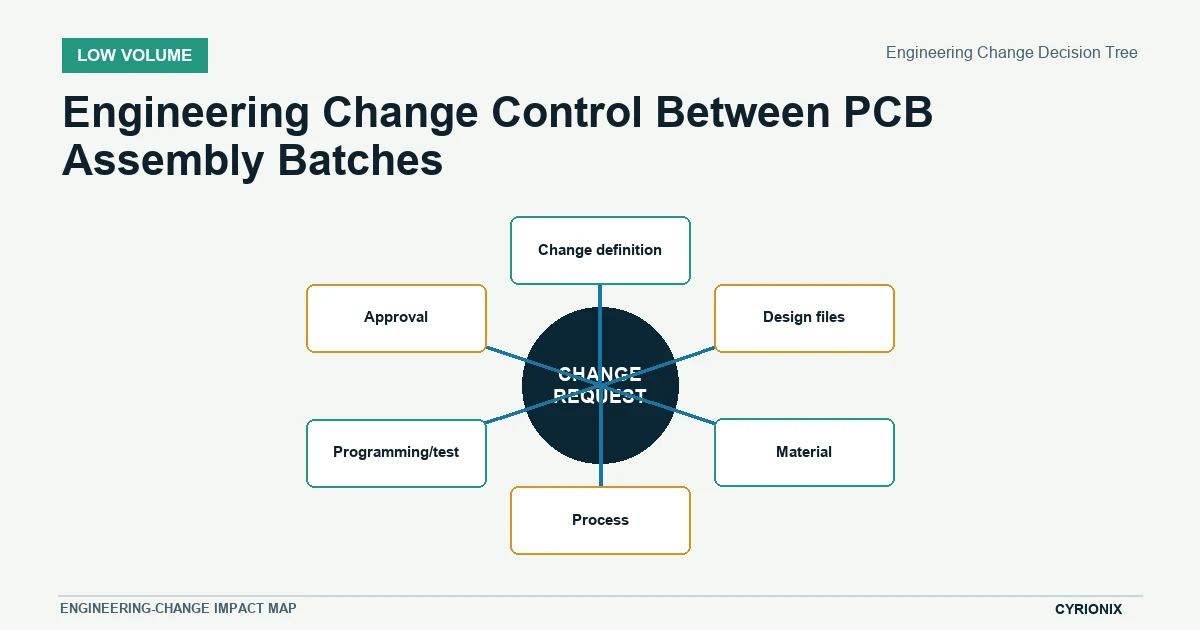
Engineering Change Decision Tree
Follow every branch affected by the change, even when the design edit appears small. A footprint, firmware, or alternate-part change can alter several downstream controls at once.
| Decision factor | How to evaluate it | Stop condition |
|---|---|---|
| Change definition | State exactly what changes and the intended effective batch. | The change scope is open-ended. |
| Design files | Regenerate affected fabrication, placement, drawing, and variant outputs. | Old and new files share an active release location. |
| Material | Review on-hand stock, open orders, substitutes, and obsolete items. | Disposition cost or ownership is unresolved. |
| Process | Revisit stencil, profile, assembly instruction, inspection, and rework impacts. | Manufacturing instructions still describe the old build. |
| Programming/test | Version binaries, fixtures, scripts, limits, and result templates together. | Firmware or test revision can drift from hardware. |
| Approval | Record cross-functional acceptance and close superseded work. | Any impacted owner has not signed off. |
Define the change
State what changes, why it changes, which products or variants are affected, and the first batch that should use it. An open-ended request cannot be translated into controlled manufacturing work.
Assess file and material impact
Regenerate affected Gerbers, drill files, CPL, BOM, drawings, and variant outputs from the new design state. Review on-hand stock and open orders before deciding whether material can be used, reworked, returned, or quarantined.
Disposition old stock
Record quantities and locations of old PCBs, components, labels, programmed devices, and assemblies. Assign commercial and engineering ownership for use-as-is, rework, return, or scrap decisions.
Update programming and test
Version firmware, programming instructions, fixtures, scripts, limits, and result templates with the hardware change. Confirm whether prior reference units and test evidence remain valid for the new baseline.
Approve the new baseline
Engineering, sourcing, manufacturing, test, and project owners should acknowledge their affected inputs. Close or archive superseded work so an old package cannot be mistaken for the active release.
Change-control decision tree
The release decision is complete when design files, material, process instructions, firmware, test, approvals, and effective-batch identity agree. Any unresolved branch remains a hold with a named owner.
Release the change as a new baseline
- Trace the impact. Review every file, material, process, and test item touched by the change.
- Resolve old work. Disposition inventory, open orders, and units already in progress.
- Publish one active package. Record approvals and the effective batch.
Related Cyrionix resources
Continue with the low-volume PCB assembly service and revision-control guide when preparing the next batch.